
Appearance
First scriptgraph: a timed instruction
Goal: show an instruction after an external start signal and a five-second timer.
Test this example in game before using it in a mission.
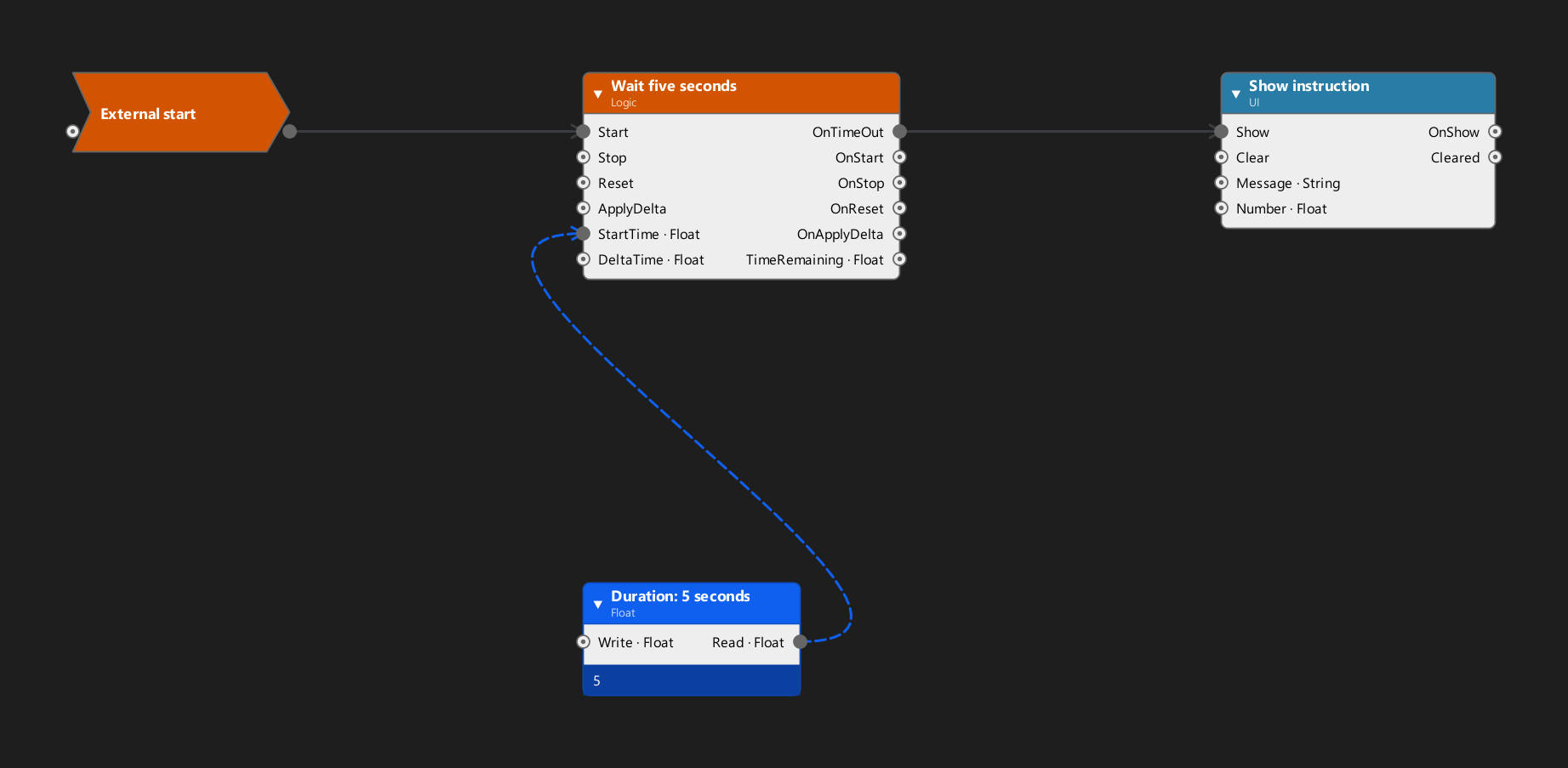
Nodes and settings
| Label | Native class or type | Setting |
|---|---|---|
| External start | SignalRelayAction | Receives the trigger from the surrounding graph |
| Wait five seconds | TimerAction | StartActive=false; reset on repeated start |
| Duration: 5 seconds | Float variable | Value 5 |
| Show instruction | HUDFlatMessageAction | MessageText="Reach the marked location."; ClearOnUnload=true |
Connections
| From | To | Kind |
|---|---|---|
External start: Out | Wait five seconds: Start | Signal |
| Duration variable | Wait five seconds: StartTime | Variable binding |
Wait five seconds: OnTimeOut | Show instruction: Show | Signal |
Reproduce in Logic
- Open a supported zone's Logic workspace and create a scriptgraph if needed.
- Add the three actions and a float variable. Use the native class names above to identify the actions.
- Set the float to
5and bind it to the timer'sStartTime. - Set
StartActiveto false,ResetTimeOnStopto false,ResetTimeOnTimeOutto false, andRepeatedStartInputBehaviortokTimer_ResetAlways. - Set the message's text and
ClearOnUnloadproperty as listed above. - Connect the signal pins as shown, then connect a real encounter trigger to the relay's
In.
The relay does not start itself. This example does not create a waypoint; its text only refers to one. If you reuse it outside an unloading zone, provide a suitable Clear signal for the message when the surrounding encounter ends.
Verify
Save and reopen the edited zone. Confirm that the duration and connections survived. In-game, confirm that the chosen trigger fires once, the timer waits as expected, and the instruction is cleared at the intended point.